The Time Stop: When “Not Working Yet” Means “Get Out”

You’ve probably had this trade. You buy, price creeps up five pips, slips back, creeps up again, and two days later you’re still staring at it. It hasn’t hit your stop. It hasn’t hit your target. It just sits there, using up your margin and your attention.
Most new traders plan their exits around price alone. A time stop adds one more question to your plan: how long should this trade take to start working?
What Is a Time Stop in Trading?
A time stop is a rule that closes a trade after a set amount of time if the trade hasn’t done what you expected. You can measure that time in candles on your chart, in hours, or by the calendar, such as “out before Friday’s close.”
Your regular stop loss answers “Where am I wrong?” A time stop answers “How long will I wait to find out?” If stops are new to you, start with our lesson on what a stop loss is.
Time stops come in two main types:
- Performance time stops close a trade if it hasn’t reached a set profit level within a set number of candles.
- Calendar time stops close a trade before a fixed point in time, such as the end of a session, a big scheduled release, or the weekend.
Our article 5 Exit Strategies To Consider in Each Trading Setup gave time stops a short summary. This guide shows you how to build one, step by step.
Why Exit a Trade That Isn’t Losing?
A flat trade looks harmless. It still costs you in three ways.
Your setup has a shelf life. Some setups, like breakouts, depend on price moving quickly. If your breakout trade sits near the level for hours, the reason you entered may be fading, even though price never touched your stop.
Dead money ties you up. A stalled trade holds margin and risk you could put toward a fresh setup. It also keeps your eyes glued to the chart. If you hold past 5:00 PM ET, most brokers roll the position over and pay or charge you a small amount of interest called swap.
Time adds event and gap risk. The longer you hold, the more news releases and weekends you sit through. Forex trading stops at Friday’s 5:00 PM ET close, and most brokers reopen around 5:00 PM ET Sunday. If news breaks over the weekend, price can open past your stop. A stop order then fills at the next available price, which can be worse than your level. Our forex trading sessions lesson walks through a weekend gap example.
How Do You Set a Time Stop?
Here’s one way to build a performance time stop. Work through it before you enter, not while the trade is open.
- Define “working” in R. R is the distance from your entry to your stop loss. If your stop is 30 pips away, 1R is 30 pips, and +0.5R is 15 pips in your favor. Measuring in R lets one rule fit both tight and wide stops.
- Pick the window from your own trades. Go through your trading journal or backtest and count how many candles your winning trades took to reach +0.5R. For example, say you review 30 past trades and most winners got there within 6 to 8 candles. A window a bit longer than that, such as 10 candles, gives normal trades room and still catches the ones that stall. Your number will differ by setup, pair and timeframe. No single window works best for everyone.
- Write the full rule down. For example: “If price hasn’t reached +0.5R by the close of the 10th candle after entry, I close the trade at market.” Also write what happens if price does reach +0.5R. In this example, the time stop switches off, and your stop loss and target take over.
- Keep your price stop in place. The time stop sits on top of your stop loss. It never replaces it.
- Check at candle closes. Note the time your 10th candle closes so you don’t have to watch every tick.
What Does a Time Stop Look Like on a EUR/USD Trade?
This example uses made-up prices to show how the rule works. It is not a real trade or a forecast.
You buy EUR/USD on the 1-hour chart at 1.1600. Your stop loss is at 1.1570, 30 pips away, so 1R is 30 pips. Your target is 1.1660, or +2R. Your time stop says: if price hasn’t traded at 1.1615 (+0.5R) by the close of the 10th one-hour candle, close at market. Here are three ways the trade could play out:
- Path A, the stall: Price chops between 1.1588 and 1.1612 for 10 hours and never touches 1.1615. The 10th candle closes at 1.1604, so you exit for +4 pips before costs. The trade didn’t hit your stop, but it didn’t do what the setup called for either, and you’re free to look for the next one.
- Path B, the trade works: Price reaches 1.1617 on the 4th candle. The +0.5R test passes, so the time stop switches off. From here, only your stop at 1.1570 and your target at 1.1660 decide the exit.
- Path C, the fast loss: Price drops to 1.1570 on the 3rd candle. Your stop loss closes the trade for a 30-pip loss (-1R) long before the time stop matters.
Path C is the reason you keep the price stop. The time stop only deals with slow, sideways trades. It can’t protect you from a fast move against you.
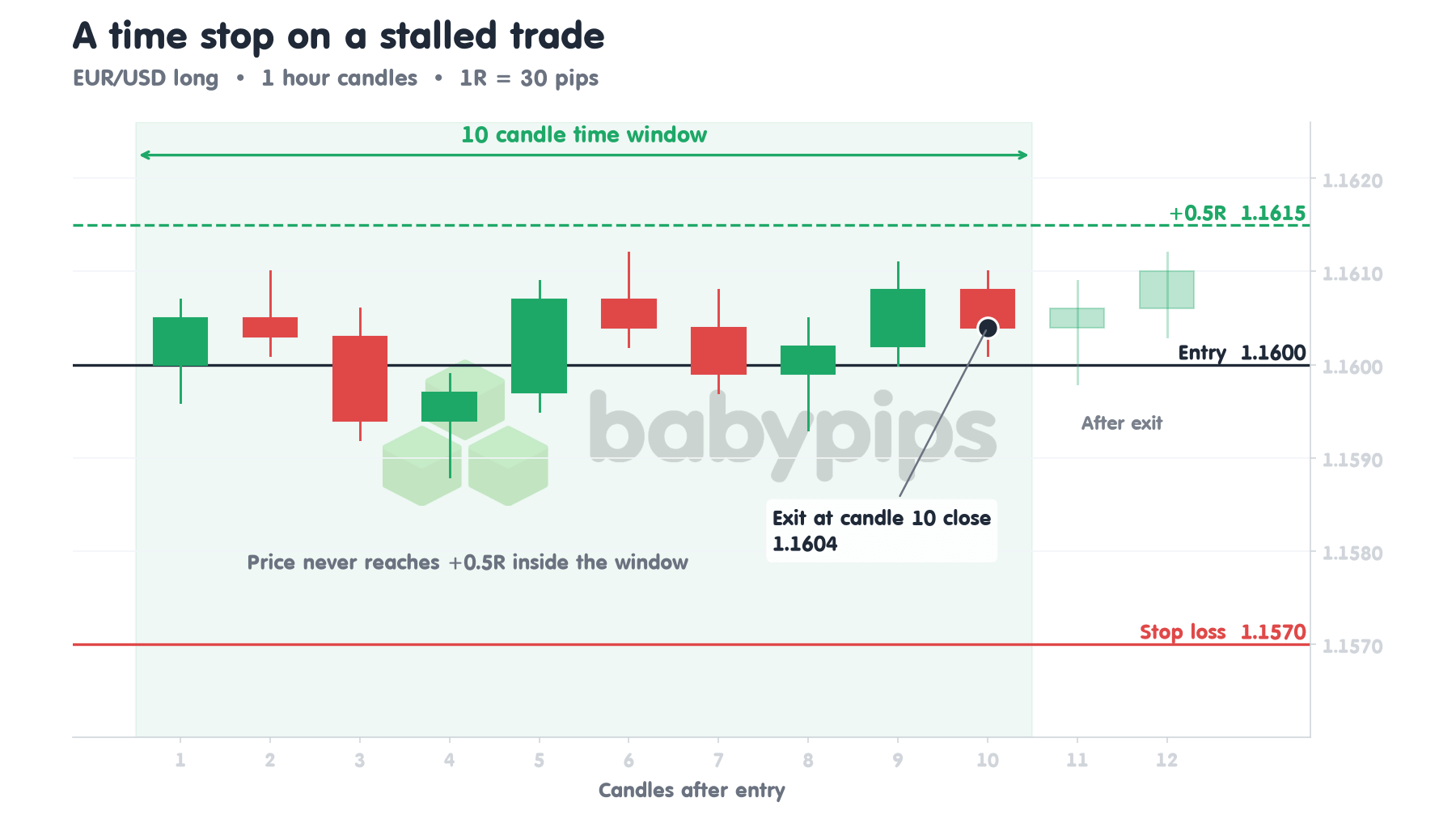
Illustration only, not real prices or a real trade. Path A, the stall: price never reaches +0.5R within 10 candles, so the time stop closes the trade at the 10th candle’s close.
What Mistakes Do Traders Make With Time Stops?
- Using it instead of a stop loss. “I’ll give it 10 candles” with no stop in place leaves you open to a big move inside any one of those candles. Keep both.
- Stretching the window mid-trade. Adding “just two more candles” because the trade is almost there turns your rule into a hope. If your journal shows your winners often need longer, change the window for future trades, not the open one.
- Using one window for every chart. Ten candles on a 5-minute chart is less than an hour. Ten candles on a daily chart is two trading weeks. Build each window from the setup and timeframe you trade. Your stop distance changes with volatility too, which our Average True Range (ATR) lesson covers.
- Ignoring the clock. Ten 1-hour candles that start at 3:00 PM ET run through the quiet hours around the New York close. A stall during slow hours may tell you less than a stall during the busy London session. Some traders count only candles from the sessions they trade. Pick your method before you enter.
- Judging the rule on one trade. Sometimes a time stop will close a trade right before it takes off. That will sting. Log every time stop exit and review the rule over many trades before you decide whether to keep it, change it or drop it.
Time Stop Checklist
Run through this list before you place a trade that uses a time stop:
- My price stop loss is set.
- I’ve defined “working,” such as +0.5R.
- I picked my window from my own trades for this setup and timeframe.
- I know what I’ll do when the window ends, such as closing at market.
- I know which news releases, and whether a weekend, fall inside my holding time.
- I’ll log every time stop exit so I can review the rule later.
A time stop only works on top of a well-placed price stop. Premium members can read our lesson:
📖 How to Set a Stop Loss Using Volatility
Reading this helps you understand how far beyond a key level your stop should go, how ATR helps you measure that distance, and how to trail a stop with the Chandelier Exit.
👉 Subscribe to Babypips Premium for full access to every School of Pipsology lesson.